Implementing an Applicant Tracking System The Right Way
A practical guide to implementing an applicant tracking system. Learn how to plan, select, migrate, and launch an ATS that your whole team will actually use.
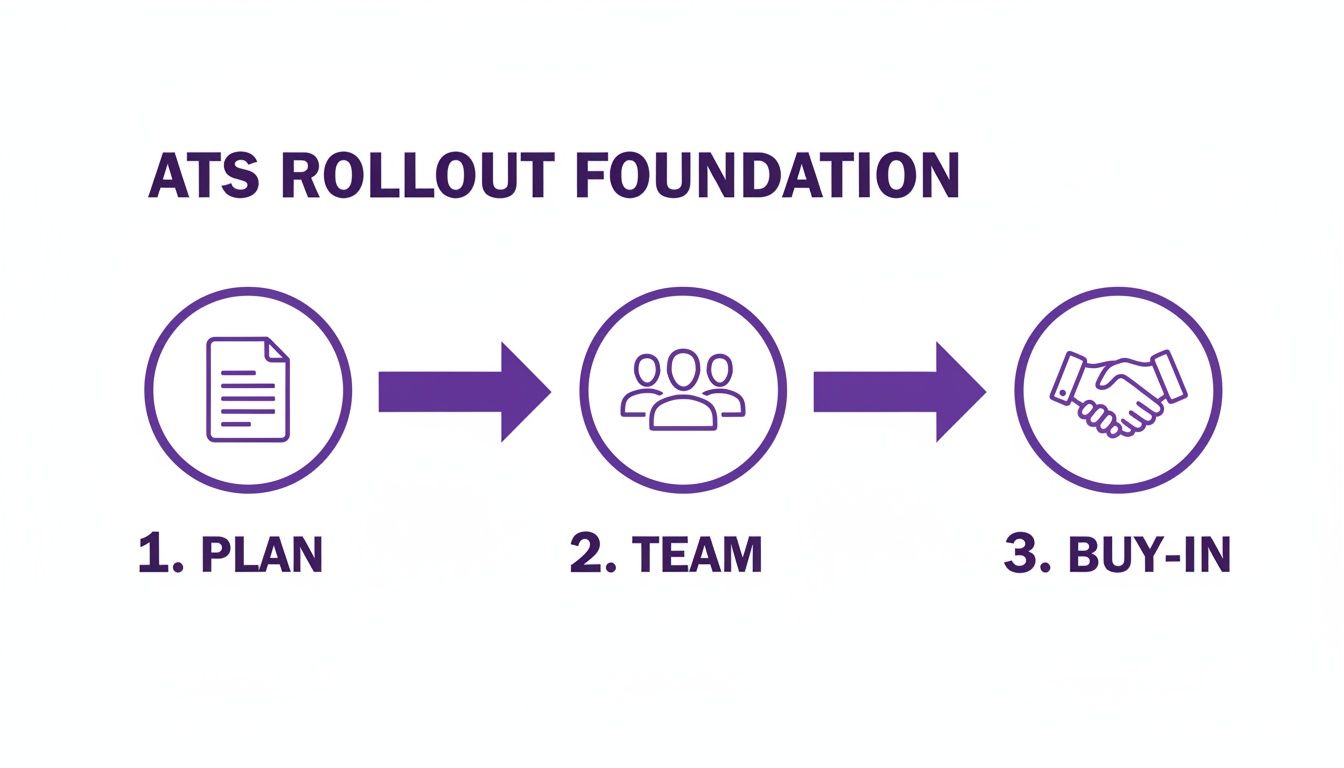
Bringing a new Applicant Tracking System into your business is a major project, and the real work starts long before you even look at a single piece of software. It all begins with building a solid business case, pulling together a cross-functional project team, and getting genuine, enthusiastic buy-in from stakeholders. Get this right, and you're set up for a smooth, successful rollout.
Listen to the podcast here:
Building Your Foundation for a Seamless ATS Rollout
Jumping into an ATS implementation without a proper plan is like trying to build a house without blueprints. This initial prep phase is easily the most critical part of the entire project. It sets the tone for everything that follows and is the biggest factor in whether your new system becomes a celebrated tool or just another frustrating hurdle.
Success at this stage is all about nailing the pre-launch planning and making sure everyone, from the C-suite right down to the hiring managers on the front line, is aligned and on board. It’s less about the tech itself and more about the people, your current processes, and your purpose. This is where you clearly define why you need an ATS and exactly what you expect it to achieve for the business.
Crafting a Compelling Business Case
First things first: you need to translate the need for an ATS into a compelling business case that gets the leadership team nodding along. Don't just say, "we need to hire faster." You need to talk their language – tangible, measurable outcomes backed by data.
Start by calculating your current time-to-fill and project how much a new system could realistically reduce it. Map out where the real costs are in your recruitment process.
To build a rock-solid case, focus on these key areas:
- Cost Savings: Show them the money. Demonstrate how an ATS can directly lower recruitment costs by reducing your reliance on pricey agencies, cutting down the admin hours spent on manual tasks, and optimising your job board spend. For a small business, saving £1,500 per hire is a massive financial win.
- Efficiency Gains: Lay out your current hiring workflow and pinpoint all the bottlenecks. This is where you show how automation can wipe out repetitive tasks like manually sifting through CVs, scheduling interviews, and sending out endless follow-up emails. This frees up your HR team for the strategic work that actually matters.
- Improved Quality of Hire: Explain how a centralised system fosters better collaboration between recruiters and hiring managers, which naturally leads to smarter candidate evaluation and selection. A good ATS provides the data to track which sources are actually delivering your best long-term employees.
Assembling Your A-Team
Here’s a common mistake: thinking an ATS implementation is just an HR project. It's not. To make it a success, you need a cross-functional team with diverse perspectives and expertise. Think of your project team as a coalition of champions from across the business.
Your dream team should include representatives from:
- Human Resources: This is your project lead, the person who lives and breathes the recruitment process.
- IT Department: They’re essential for handling the technical questions around data security, integrations, and system compatibility.
- Hiring Managers: These are your key end-users. Their real-world feedback on what they actually need the system to do is invaluable.
- Finance: You'll need them to keep the project on budget and, crucially, to help track the financial ROI after you go live.
A project team with representation from across the business doesn't just provide different skills; it builds a network of advocates who will champion the new system within their own departments, dramatically increasing the chances of widespread adoption.
Securing Stakeholder Buy-In
With your business case drafted and your A-team assembled, the final piece of the foundation is securing genuine, enthusiastic buy-in. This goes way beyond just getting a signature on a purchase order. It’s about creating a bit of a buzz and showing the value for every single person who will touch the system.
You need to clearly communicate the "what's in it for me" for each group. For executives, it’s all about the ROI and strategic talent acquisition. For hiring managers, it's about spending less time on admin and more time interviewing brilliant candidates. For your recruiters, it’s about giving them a powerful tool that makes their job easier and more effective.
If you need a refresher on the core benefits, our guide on what an applicant tracking system is is a great place to start.
Managing expectations and communicating your vision clearly from the outset will turn this implementation from a top-down mandate into a welcome upgrade for everyone involved.
Choosing an ATS That Truly Fits Your Hiring Needs

The market is flooded with Applicant Tracking Systems, each one promising to solve all your hiring headaches. But here’s the truth: the secret to a successful ATS implementation isn't finding the one with the longest feature list. It’s about finding the one that solves your specific problems.
Before you even think about booking a demo, you need to get crystal clear on what "better" actually looks like for your team.
This clarity doesn’t come from a sales pitch; it comes from looking inward. Get your key people—the recruiters and hiring managers on the front line—in a room for a brutally honest workshop. The aim isn't to talk about software features. It's to map out your current hiring process, step by painful step.
Where are the black holes that candidates disappear into? Why does it take an eternity for managers to give feedback? What are the mind-numbing, repetitive tasks eating up your recruiters' day?
These frustrations are gold dust. They’re the raw materials for building a requirements blueprint that separates the essentials from the shiny distractions.
Turning Gripes into Must-Have Features
Once you have that map of your current process, complete with all its bottlenecks and bumps, you can start translating those pain points into a concrete list of must-have features. This is where you build the bridge from your current struggles to your future solution. It's about turning complaints into a functional checklist.
For example, if your recruiters are tearing their hair out manually posting jobs to a dozen different boards, then one-click multi-posting becomes a non-negotiable. If managers are drowning in disjointed email chains to discuss a candidate, you absolutely need a system with centralised communication and evaluation tools.
Don't get distracted by impressive-sounding features you'll never actually use. A clear, prioritised list of requirements, built from your team's real-world pain points, is your most powerful weapon for cutting through the marketing noise and making a smart choice.
The demand for these tools across the UK is surging. Valued at USD 355 million in 2023, the UK's ATS market is forecast to hit USD 586 million by 2029, a clear sign that businesses are desperate for more efficient recruitment. This growth means more options for you, which makes having a solid requirements list more critical than ever.
Tailoring Requirements to Your Industry
Of course, your industry’s unique quirks will heavily influence your priorities. A one-size-fits-all approach to implementing an applicant tracking system almost never works, simply because different sectors face wildly different challenges.
Think about these sector-specific needs:
- Healthcare: Compliance is king. Your ATS absolutely must have robust features for tracking certifications, DBS checks, and managing CQC compliance documentation without any fuss. You’ll need customisable workflows that can enforce these mandatory checks before an offer can even be made.
- Hospitality: This sector is all about high-volume, often seasonal, hiring for similar roles across multiple locations. An ATS built for hospitality needs powerful candidate pooling, bulk communication tools, and a lightning-fast, mobile-first application process to capture interest on the spot.
- Small and Medium Businesses (SMBs): For smaller teams, it's all about simplicity, affordability, and getting the most bang for your buck. The best system will automate the core tasks without drowning a small HR team in unnecessary complexity. A great place to start is our guide on the 10 best applicant tracking systems in 2025, which breaks down some top contenders.
To help you get started, here's a simple framework for how different sectors might prioritise features.
ATS Feature Prioritisation Framework by Sector
| Feature | Healthcare (High Priority) | Hospitality (High Priority) | SMBs (High Priority) |
|---|---|---|---|
| Compliance Management | CQC/DBS tracking, certification management, audit trails. | Right-to-work checks, visa status tracking. | GDPR compliance tools, basic document management. |
| Bulk Communication | Less critical, focus on targeted communication. | Essential for seasonal hiring, job fairs, and updates. | Useful for managing applicant pools for common roles. |
| Candidate Sourcing | Niche job boards (NHS Jobs), professional networks. | High-volume job boards, social media, walk-in tracking. | General job boards, employee referrals, social media. |
| Mobile Application | Important for accessibility. | CRITICAL for capturing on-the-go applicants. | Highly desirable for better candidate experience. |
| Workflow Automation | Enforcing mandatory compliance steps, interview scheduling. | Screening questions, auto-rejections, interview self-scheduling. | Automating job posting, screening, and basic communication. |
| Reporting & Analytics | Diversity reporting, time-to-hire for critical roles. | Source effectiveness, applicant volume by location/season. | Cost-per-hire, time-to-fill, source effectiveness. |
This isn't an exhaustive list, but it shows how your focus needs to shift based on your specific operational reality.
By creating this detailed requirements blueprint—one that's grounded in your team's daily challenges and fine-tuned for your industry—you turn the daunting task of vendor selection into a straightforward process. You'll be able to confidently disqualify unsuitable systems and focus your energy only on the platforms that can genuinely move the needle for your hiring goals.
Handling Data Migration and System Integration
This is often the point where the excitement of a new ATS meets the cold, hard reality of IT. Let's be honest: moving your candidate and job data from its old home—whether that’s a clunky legacy system, a maze of spreadsheets, or scattered email inboxes—into a shiny new platform can feel less like an HR project and more like a complex tech puzzle.
And it doesn't stop there. You need your new ATS to talk to the other tools you rely on every day, like your HR Information System (HRIS) or payroll software. The goal is to create a seamless, connected ecosystem, not just another siloed piece of tech. Get this wrong, and you’re looking at data loss, frustrated hiring managers, and months of painful workarounds.
The Golden Rule of Data Migration: Clean Up First
Before you move a single byte of data, you have to deal with the state it’s in right now. I’ve seen it happen time and time again: teams are so eager to get going that they just "lift and shift" everything into the new system. This is your one chance for a fresh start, so don’t squander it.
Think of it like moving house. You wouldn't just shovel everything from your old cupboards into boxes and dump it in your new kitchen. You'd sort through it, throw out the out-of-date tins, and organise what’s left. It's exactly the same with your data. Migrating messy, outdated, or duplicate candidate profiles will cripple your new system's effectiveness from day one.
Key Takeaway: The single most important thing you can do for your new system's long-term success is to clean your data before you migrate. A clean dataset is what gives you accurate reports, reliable searches, and a foundation you can actually trust for your hiring decisions.
Start by archiving old, irrelevant candidate profiles (making sure you’re compliant with UK GDPR). Merge those duplicate entries that have been bugging you for years, standardise your job titles, and make sure essential fields are complete. The effort you put in here pays off tenfold down the line.
Creating a Practical Migration Checklist
A scattergun approach is a recipe for chaos. You need to work closely with your new ATS provider and your internal IT team to map out every single detail of the transfer. Leave nothing to chance.
Your checklist should nail down the specifics:
- Data Mapping: Define exactly which data fields from your old system will move to which fields in the new one. For instance, 'Candidate Status' in your spreadsheet might map to 'Pipeline Stage' in the new software. Be precise.
- Data Cleansing Plan: Who is responsible for cleaning the data? What are the specific rules for archiving or merging files? Get it in writing.
- Timeline and Milestones: Set firm dates for the data export, the cleansing process, a test migration (this is non-negotiable!), and the final 'go-live' migration.
- Validation Process: How will you know if it worked? Plan to spot-check a meaningful sample of records to ensure names, contact details, and application histories have all come across correctly.
For a more detailed breakdown, our guide on how to switch to a new ATS in 5 easy steps offers some extra practical tips to keep your transition smooth.
Building Bridges: System Integration
An ATS can't operate in a vacuum. To get rid of soul-destroying double-data entry and create that elusive single source of truth, it has to connect with your other core business systems. You want a smooth, automated flow of information across your HR tech stack.
The most common—and valuable—integrations are:
- HRIS Integration: This is probably the most critical link. When you mark a candidate as 'Hired' in your ATS, their data should flow automatically into your HRIS to create their new employee record. This single integration saves countless hours of admin and prevents embarrassing typos.
- Careers Page Integration: Your ATS should be the engine behind the jobs section of your company website. This ensures new roles are posted instantly and applications drop directly into the system without anyone needing to touch them.
- Payroll and Onboarding Tools: Connecting your ATS here can automate the final steps of the journey, from kicking off payroll setup to triggering the welcome email and onboarding tasks for new starters.
- Email and Calendar Sync: For recruiters and hiring managers, this is a huge quality-of-life improvement. Integrating with tools like Outlook or Google Calendar makes scheduling interviews and communicating with candidates far less of a headache.
Navigating Common Integration Headaches
While modern systems often use APIs (Application Programming Interfaces) to make these connections easier, it's rarely a simple 'plug-and-play' job. Be ready for a few bumps in the road.
A classic headache is the dreaded "data sync error," where information updated in one system doesn't correctly transfer to the other. For instance, a candidate's status changes in the ATS, but the update fails to push to the HRIS. The key here is to work with your vendors to establish clear "if this, then that" rules and test every scenario thoroughly before you go live.
Another common tripwire is a mismatch in data formats. One system might record dates as DD/MM/YYYY and another as MM-DD-YY. These tiny discrepancies can cause an entire integration to fail. Identifying and sorting out these mapping issues during the planning phase is absolutely crucial for a successful launch.
Customising Workflows and Embedding Compliance
An out-of-the-box applicant tracking system is a decent start, but its real power comes alive when you mould it to fit your unique hiring process. This is the point where you move from having just another piece of software to owning a proper recruitment engine—one that genuinely reflects how your team screens, interviews, and brings the best people on board.
Tailoring your ATS isn't about slapping on your company logo; it's about embedding your operational DNA into its very core. It means setting up workflows that guide recruiters and hiring managers through your distinct stages, from ‘Application Received’ to ‘First Interview’ and all the way through to ‘Offer Accepted’.

Mapping Your Hiring Journey
Before you even think about touching the settings, grab a whiteboard and your team. The first, and most crucial, step in customisation is to map out every single stage of your current hiring journey. Don't guess. You need to get the real-world picture from the people doing the work. What actually happens the moment a candidate applies? Who reviews their CV, and in what order?
This visual map becomes the blueprint for your ATS workflows. For most businesses, it looks something like this:
- New Applicant: The landing zone for all incoming applications.
- HR Screen: Your recruitment team does the initial once-over.
- Manager Review: Shortlisted candidates are passed to the hiring manager for their input.
- First Interview: Promising candidates are scheduled for an initial chat.
- Final Interview: The strongest contenders meet the wider team or senior leaders.
- Offer Stage: The final candidate gets the good news.
Once you’ve got this locked down, you can build it directly into the system, creating a clear, consistent path for every single applicant. No more guesswork.
Automating Communication and Actions
With your stages clearly defined, you can start weaving in smart automations. This is where you really start to claw back time and eliminate the soul-crushing admin that lets good candidates fall through the cracks. It’s not just about efficiency; it's about creating a slick, professional experience for every applicant.
Think about setting up automated triggers at key moments:
- Application Confirmation: An instant, branded email goes out the moment someone applies. It’s a small touch, but it tells them they’re in the system and you’ve got their details.
- Stage Movements: When a recruiter moves a candidate from ‘HR Screen’ to ‘Manager Review’, the system can automatically ping the hiring manager with a task, prompting them for feedback.
- Rejection Emails: Let’s be honest, nobody likes sending them. Automating a thoughtful, polite rejection email ensures candidates who aren’t a fit are still treated with respect and kept in the loop.
If you’re ready to get more sophisticated with this, our guide on how to automate your workflow using HR tech integrations has some great advanced strategies.
Embedding Compliance from the Ground Up
For any UK business, compliance isn't an optional extra—it has to be baked into your hiring process from day one. This is non-negotiable, especially when you're handling sensitive candidate data under the UK’s stringent General Data Protection Regulation (UK GDPR). Your ATS should be your first line of defence.
An effective ATS doesn't just store data; it actively helps you manage your compliance obligations. From tracking consent to automating data retention policies, the right configuration turns a potential legal headache into a seamless, automated process.
Start by getting these essential compliance features configured straight away:
- Consent Tracking: Make sure your application forms have a clear, affirmative opt-in for candidates to agree to you storing and processing their data. That consent needs to be logged against their profile automatically.
- Data Retention Policies: Set up automated rules to purge candidate data after a specific period, like 12 months. This "set it and forget it" approach is crucial for meeting UK GDPR's data minimisation principle.
- Secure User Permissions: Not everyone on the team needs to see everything. Configure role-based access so hiring managers can only view candidates for their own vacancies. This is vital for protecting sensitive information and, for sectors like healthcare, can be extended to control access to CQC-related documentation.
By customising your workflows and building in compliance from the very beginning, your ATS stops being just a database. It becomes a strategic tool that enforces best practices, protects your business, and creates a much better experience for both your hiring team and your future employees.
Winning Over Your Team with Smart Training
Let's be honest. Even the most powerful applicant tracking system will gather dust if your team sees it as just another piece of admin. The real success of any new ATS isn't about the bells and whistles; it’s all about user adoption. This is where thoughtful, continuous training and clever change management come into play.
A single, two-hour training session on launch day is a classic mistake and a recipe for disaster. What you're aiming for instead is an ongoing support system. One that builds confidence, empowers your people, and clearly shows them how this new tool makes their specific job easier. This is how you turn a mandated platform into their go-to hiring partner.
Designing Training That Actually Works
One-size-fits-all training just doesn't cut it. Your people have vastly different needs. A hiring manager doesn't need to get lost in the weeds of job board integrations, and a recruiter won’t benefit from a deep dive into executive-level reporting. The secret to getting everyone on board is to segment your training by role.
Your training plan should be a smart mix of formats to suit how different people learn best:
- For Recruiters (Your Power Users): These are the people who will live and breathe the ATS, so they need the most detailed training. Focus on live, hands-on demos covering everything from advanced candidate searching to workflow automation and reporting. Back this up with a library of short, five-minute videos they can dip into for specific tasks, like creating a new screening questionnaire on the fly.
- For Hiring Managers (Your Key Collaborators): Their time is gold. Training for them must be quick, direct, and laser-focused on the "what's in it for me?" factor. A simple, one-page PDF "cheat sheet" is perfect here—something they can pin up, showing them exactly how to review candidates, drop in feedback, and see their hiring pipeline at a glance. A 15-minute recorded webinar usually hits the sweet spot for this group.
- For Admins (Your System Guardians): This small but mighty group needs to get under the bonnet of the system. We're talking user permissions, compliance settings (especially for CQC or GDPR), and data management. Get them on dedicated calls with your ATS provider's support team to walk through every nook and cranny of the back-end configuration.
The Secrets of Change Management
Beyond the 'how-to' of formal training, you've got to manage the human side of the shift. People are naturally wired to resist change, which makes your communication strategy absolutely critical. You need to get out ahead of their concerns and start building a bit of a buzz.
At its core, successful change management is all about consistent communication that answers one simple question for every single user: "How does this make my job better?" When people see the direct benefit to their day-to-day work, that resistance quickly melts away.
A great tactic is to appoint a few enthusiastic team members as internal ‘super-users’. These are your champions on the ground—maybe a tech-savvy recruiter or a super-organised hiring manager. Give them some extra training and empower them to be the first port of call for their colleagues' questions. It creates a peer support network that feels far more approachable than logging a formal IT ticket.
Finally, shout about the benefits early and often. Before you even launch, share a few success stories of how similar companies slashed their time-to-fill. Once you're live, celebrate the small wins in team meetings—like the hiring manager who filled that tricky role in record time using the new system. This constant, positive reinforcement proves the value of the change and is the best way to get any reluctant users over the line.
Measuring Your Success and Planning for the Future

Getting your new ATS live is a huge achievement, but it’s really the starting line, not the finish. The real magic happens over time, and it all comes down to tracking its impact and committing to continuous improvement. Now’s the time to shift your thinking from project launch metrics to long-term performance metrics.
Your focus should be squarely on the key performance indicators (KPIs) that prove the system's value and shine a light on where you can optimise further. This isn't just about crunching numbers; it's about turning data into actionable insights that sharpen your hiring strategy and show a clear return on investment to leadership.
Identifying Your Core Recruitment KPIs
Your ATS is an absolute goldmine of data. The trick is to ignore the vanity metrics and zero in on what truly matters for your business goals—numbers that reflect hiring efficiency, cost, and, most importantly, quality.
Get into the habit of regularly tracking these essential KPIs, which you should be able to pull directly from your ATS dashboard:
- Time-to-Fill: The classic efficiency metric. How many days does it take on average from opening a role to getting an offer accepted? A steady drop here is a clear sign your new workflows are paying off.
- Cost-per-Hire: Add up all your recruitment costs—job board spend, agency fees, recruiter hours—and divide by the number of hires. Your ATS should be helping you push this number down.
- Source of Hire: Pinpoint exactly where your best candidates are coming from. Is it LinkedIn, a niche industry job board, or your employee referral programme? This data tells you where to double down and where to cut wasteful spending.
- Quality of Hire: This is the ultimate measure of success. You can track it by connecting ATS data with performance reviews after 6-12 months. High-performing new hires are the best proof that your recruitment process is working.
The impact here isn't small. Research shows that 79% of recruiters see a noticeable improvement in hire quality after adopting an ATS. On top of that, new hire turnover can fall by an average of 40%. In fact, a massive 94% of UK organisations using an ATS report a positive impact on their hiring process.
Creating a Continuous Feedback Loop
Data tells you one side of the story, but your team tells the other. The long-term success of your ATS hinges on how well it adapts to the real-world needs of your recruiters and hiring managers. Don't just assume that no news is good news.
You need to actively seek out feedback to find those little friction points and identify opportunities for improvement. You can learn more about quantifying the value of an applicant tracking system (ATS)/) in our detailed guide.
Build a regular rhythm for gathering user insights. It doesn’t have to be complicated:
- Quarterly Check-ins: Arrange brief, informal chats with your power users and a handful of hiring managers. Ask them what’s working well and what’s still causing them headaches.
- Annual User Surveys: Send out a short, simple survey to everyone who uses the system. Ask them to rate their satisfaction and offer suggestions for new features or workflow adjustments.
- Monitor Adoption Rates: Keep an eye on your ATS admin panel. Who is using the system consistently, and who isn’t? If a particular department has low usage, it might be a sign they need a bit of targeted retraining.
This constant loop of data analysis and human feedback is what keeps your ATS from becoming a static, outdated tool. It allows the system to evolve right alongside your organisation, delivering more and more value long after the initial launch day.
Got Questions About ATS Implementation?
Even the best-laid plans come with questions. When you're rolling out a new applicant tracking system, a few things are bound to pop up. Here are some of the most common queries we hear from teams going through this for the first time.
How Long is This Actually Going to Take?
Honestly, it depends. A small business with clean data and simple hiring steps might be up and running in a few weeks. But for a larger organisation with tangled workflows, a mountain of old data to migrate, and several other systems to connect with, you should realistically budget for a 3-6 month project. Your project plan will be your single source of truth for setting that go-live date.
What’s the Biggest Mistake We Could Make?
Rushing the planning phase. That’s the classic pitfall. If you don't take the time to really dig into how your team actually works and what their biggest headaches are before you even look at software, you're setting yourself up for failure. You risk picking a system that just creates new problems instead of solving old ones, actively getting in the way of good hiring.
The success of your ATS implementation is almost always decided in the requirements-gathering stage. Skipping this deep discovery work is the number one reason projects fail to deliver their expected value.
How Do We Get Our Hiring Managers to Actually Use It?
You have to make their lives easier. It's that simple. Frame the ATS as the solution to their biggest frustrations – no more digging through hundreds of irrelevant CVs or chasing people for interview feedback over email.
Get them involved in choosing the system so they feel a sense of ownership from day one. And when it comes to training, keep it short, sharp, and focused only on what they need to do their part of the job.
Ready to streamline your entire recruitment process with a system your team will actually want to use? SeeMeHired offers an all-in-one platform designed for in-house HR teams, simplifying everything from job posting to onboarding. Discover how SeeMeHired can transform your hiring today.
